
Search is the front door to CADdetails: in our 2026 AEC user survey, nearly 80% of respondents said they begin their experience by entering a query directly into the search bar. Because so much product discovery starts there, we rebuilt how that search works and modernized how your products get found.
Traditional keyword-based search struggles when users describe products in their own terms. Broader project language, different terminology, or highly specific technical queries don't always match the exact keywords in a product listing. To close that gap, we rebuilt our search engine from the ground up so it understands how specifiers actually search and returns faster, more relevant results.
For manufacturers, the redesigned search delivers three concrete outcomes: increased product visibility, more qualified exposure to decision-makers, and a higher likelihood of getting specified.
In this blog, we’ll explore:
- Why We Rebuilt Search on CADdetails
- How the New Search Experience Helps More AEC Professionals Find Your Products
- What the New Search Experience Means for Featured Search Placements
- What's Next for Search on CADdetails
- How to Evaluate Your Visibility in the New Search Experience
Why We Rebuilt Search on CADdetails
Searching for building products isn't as straightforward as searching on a typical e-commerce website. AEC professionals use a wide range of terminology depending on their role, project stage, technical requirements, and regional preferences. They may search using:
- Product performance requirements
- Technical specifications
- Industry abbreviations
- Application-based language
- CSI-related terminology
- Material types
- Regional terminology and naming conventions
For example, someone looking for acoustic ceiling products might search for:
- Acoustic ceiling panels for open office noise
- Ceiling products with high NRC (Noise Reduction Coefficient) rating
- Sound-absorbing ceiling system for conference room
- Decorative acoustic ceiling clouds
- Suspended ceiling for sound control
While these terms may describe related solutions, traditional keyword-based search often treats them as completely separate queries. Language itself adds another layer of complexity: approximately 40% of English words have multiple meanings, which makes it easy for a purely keyword-based system to misjudge what someone actually wants.
We wanted to create a new search experience that better reflects how specifiers actually think and work. Instead of relying solely on exact keyword matches, the new search engine understands intent, recognizes related terminology, and surfaces products based on contextual relevance. The result is a smarter search experience that helps users find the right products faster, and helps you connect with more qualified prospects.
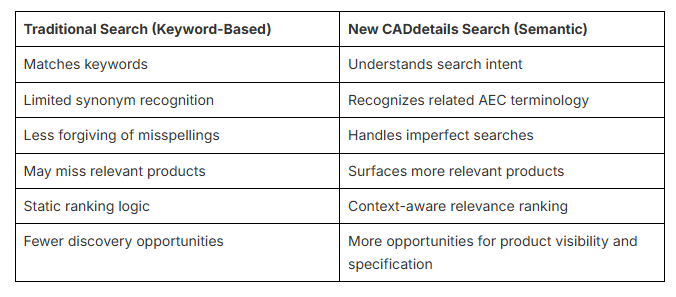
The table below highlights the key differences between traditional keyword-based search and the smarter, semantic CADdetails search experience.
For a deeper look at the underlying difference, see this explainer on keyword vs. semantic search.
A Search Experience Designed to Help Your Products Get Found
Here's a closer look at the improvements that are making product discovery faster, smarter, and more effective on CADdetails.
Faster, More Relevant Search Results
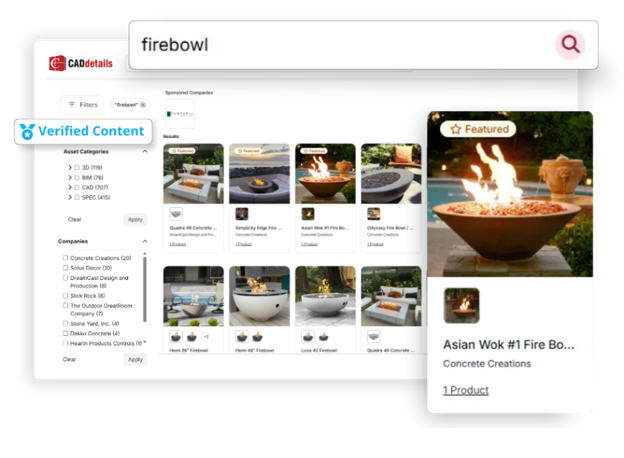
Results now rank by search intent rather than keyword overlap alone, so specifiers reach a fitting product in fewer searches and less scrolling. The results page itself is also redesigned to be easier to scan:
- More product results visible on each page
- Cleaner, easier-to-scan search results
- Improved product cards with a more consistent layout
- Better visibility for product information and key details
What this means for you: your products now have more chances to surface in a relevant search and to hold a specifier's attention once they do, since the layout puts key product details in view immediately.
Product-First Search Results
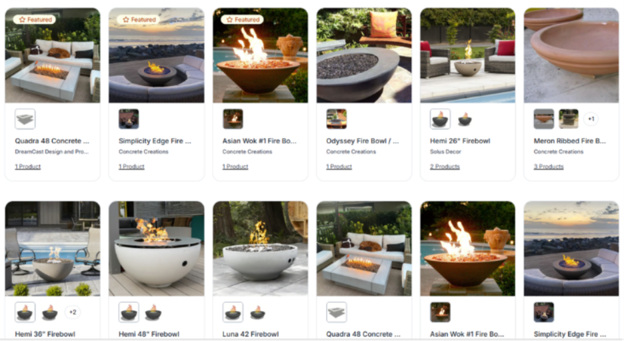
Search results now lead with the product itself instead of a file preview. Previously, filtering by file type—CAD or BIM, for example—could surface a technical file preview rather than the product, which made it harder for users to quickly identify what they were evaluating. In usability testing, showing the product first drove stronger engagement than showing the file preview first, so we made it the default across the experience, regardless of how someone searches or filters.
- Product images displayed across search results
- More consistent visual presentation throughout the search experience
- Faster product recognition and evaluation
- Greater emphasis on the products behind the files
What this means for you: your product photography now carries more weight in the decision. It's the first thing a specifier sees, ahead of any file type they're browsing for.
Built to Get Your Products Found by AI
Specifiers increasingly ask AI tools like ChatGPT, Perplexity, and Google's AI Overviews to find and recommend products for them, instead of typing keywords into a search bar themselves. AEO (Answer Engine Optimization) and GEO (Generative Engine Optimization) refer to structuring content so those AI systems can find, parse, and cite it accurately; the new search experience is built with that shift in mind.
Every listing is now connected to structured data that AI engines and search algorithms can parse directly, rather than crawl and guess at. A consistent format across listings also makes it easier for both people and AI systems to understand what they're looking at. That consistency compounds: the more complete and predictable your product data is, the more reliably it surfaces and gets represented correctly.
What this means for you: keeping your product specs, descriptions, and images complete and current directly improves how accurately both specifiers and AI tools can find and represent your products.
Better Relevance Matching
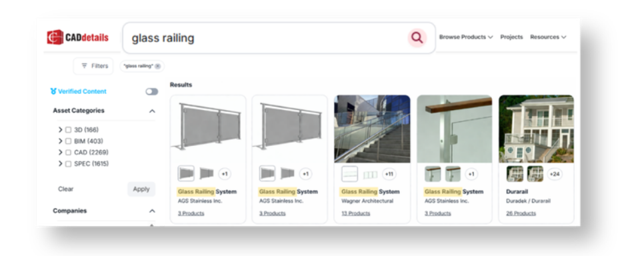
The engine is designed to recognize industry terminology, related concepts, and contextual meaning, so specifiers can find relevant products even without the exact product name or keyword. When someone searches a specific phrase or requirement, results prioritize the closest match while still surfacing related products that may fit the project.
- Improved recognition of AEC-specific terminology and technical language
- More accurate ranking based on relevance and search intent
- Better visibility for products across a wider variety of search queries
- Stronger matching for multi-word and project-focused searches
What this means for you: your products can now surface for searches that describe a need or performance requirement, not just ones that use your exact product name.
Smarter Filtering & Sponsored Results
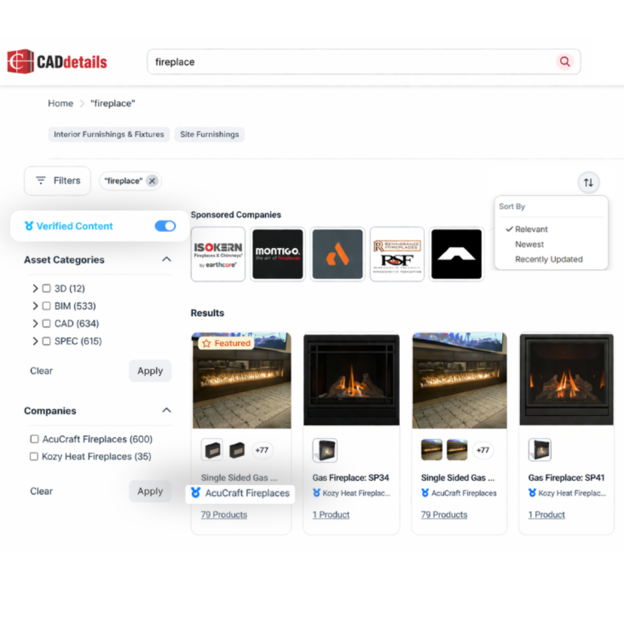
Filtering and sponsored placement logic are both sharper, so specifiers can narrow results quickly and still find products that fit their project.
- Improved on-page filters for faster, more precise product discovery
- Sponsored placements shown only when relevant to the user's search
- Sponsored Company filters that make it easier to explore a manufacturer's full product offering
- Increased visibility opportunities for manufacturers within relevant searches
What this means for you: filters now work harder to put your products in front of specifiers who are already close to a decision, rather than earlier-stage, broader browsers.
More Relevant Visibility for Your Featured Placements
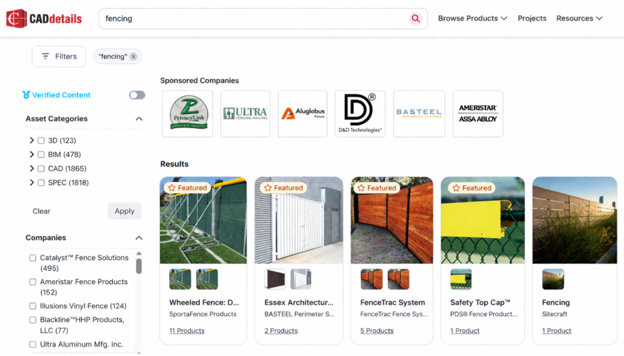
If you've invested in Featured Search placements, you'll keep the same premium visibility you have today. What changes is the experience around it: the product-first layout makes it easier for specifiers to identify, compare, and engage with what you're showing them, which helps your placement do more of its job.
What Stays the Same:
- Priority placement at the top of relevant search results
- Visibility across keyword searches, category pages, and filtered results
- Clear sponsored labeling for transparency
- Featured Company placements that showcase your brand
- Featured Product placements that highlight specific products
- Smarter relevance models
- Stronger product metadata
- Enhanced semantic understanding
- AI-assisted discovery
- More personalized results
What Changed:
The shift to product-first search means results now prioritize product imagery and information over file previews. Where technical file previews used to appear, search results now show the product itself, while every associated technical file stays easily accessible within the product listing. Plus, clicking a Featured Company now filters results to that company's products directly, keeping specifiers in the search experience instead of redirecting them to a separate profile page.
Haven't added Featured Placement yet? Explore our Ad Bundles to see how added visibility works inside the new experience, or talk to your Client Success Manager.
What’s Next for Search on CADdetails
Rebuilding search isn’t a one-time update—it's an ongoing investment in helping manufacturers get their products seen and specified by the right AEC professionals.
As technology continues to evolve, we’ll keep improving the CADdetails search experience with:
Our goal remains the same: to build stronger connections between manufacturers and specifiers with faster, more accurate product discovery.
Measure Your Visibility in the New Search Experience
Ready to explore the new search experience for yourself? Visit CADdetails, then search for your company, products, or key product categories to see how your listings appear within the updated experience.
Want to list your products on CADdetails? Book a demo here →
Cover image by Zhang qc on Unsplash