

87% of businesses say delivering measurable value from data is one of their top priorities. If you’re one of those businesses, Design Hub can help you turn your data into actionable insights that get your products specified more often.
How? Your Design Hub provides data on how your AEC (Architecture, Engineering, and Construction) audience interacts with your products—perfect for building product manufacturers looking to optimize outreach strategies and drive deeper engagement with prospects.
In this blog, we'll break down Design Hub's analytics dashboard so you can see exactly what insights are available to you. We'll also explore how your Design Hub data compares to GA4, and how to use both to refine your sales and marketing strategy and fuel your growth.
Design Hub's KPIs (Key Performance Indicators)

Here are the key metrics Design Hub tracks for you:
-
Pageviews: The total number of times users view pages that contain your company’s content.
-
Clicks: The total number of times users click on content objects, including your products, listings, collections, and projects.
-
Downloads: The total number of times users download your content.
-
Unique Users: Includes all distinct registered and anonymous users.
-
Registered User: A user who has completed the registration process or logged in using CADdetails credentials.
-
Anonymous User: A user who has not completed registration or has not logged in.
-
-
Average Events Per User: Average number of events performed by unique users (registered and anonymous) during the selected time frame.
-
Identified Activity: The percentage of events performed by identified users versus all events during the selected time frame.
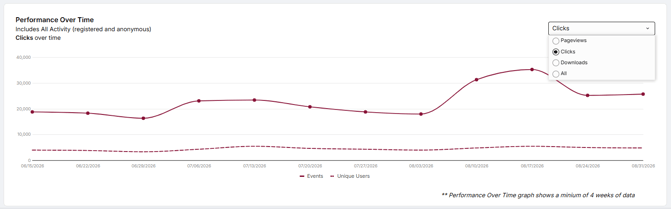
In the Performance Over Time graph, you can track Pageviews, Clicks, and Downloads individually, or all at once for comparison.
Who Is Engaging & How?
This next section breaks down your selected KPI by type and by profession, plus a list of your top 25 performing objects.
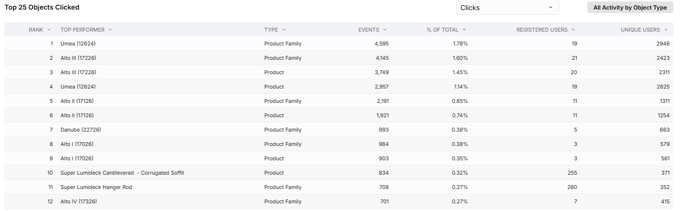
Why it matters: Tracking the number of views, clicks, or downloads over time provides valuable insights into user engagement and the popularity of your content. When combined with data from your top 25 most viewed, clicked on, or downloaded objects, you’ll gain a clear understanding of which content resonates most with your audience, allowing you to refine your offerings for maximum impact.
Then, you'll see a table of your Top 25 Registered Users, including their design firm, profession, email, and location.
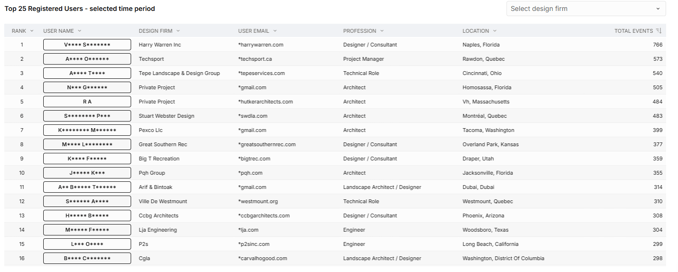
Why it matters: With a clear understanding of the specifiers interacting with your Design Hub, your marketing team can craft targeted, personalized content for them. Meanwhile, your sales team can prioritize the most active design firms, where the odds of success are higher since they've already shown interest in your products.
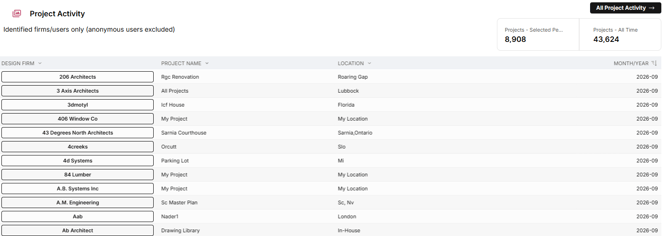
Next, you'll find the Project Activity table, which helps you keep track of all the projects your products have been included in, with helpful details like design firm, project name, and location.
Finally, there's the Lead Form Submissions section, which lets you efficiently track and manage incoming requests from potential specifiers.

Why it matters: Your sales team can use this table to follow up with interested firms and provide them with the resources they need to specify your products. You can also analyze this table to pinpoint recurring AEC questions or concerns and adjust your offerings accordingly.
Design Hub Data vs. GA4
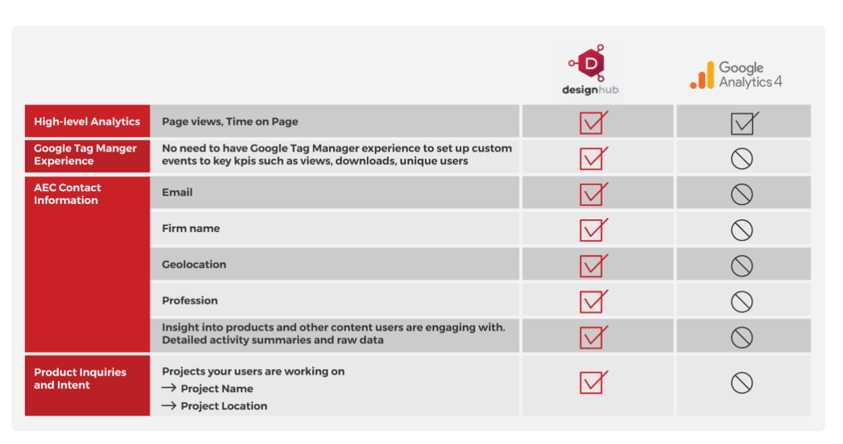
While Google Analytics provides a wide range of metrics at no cost, it's important to note that the script-level data it offers is limited in detail and accuracy. With Design Hub, you can conduct in-depth traffic analysis using first-party data from your branded site. This allows you to gain more granular insights, which can greatly enhance your marketing strategies and inform critical business decisions.
Unlike GA4, Design Hub is also fully managed and maintained by us, so you can focus entirely on using your insights to drive your business forward. Check out the chart below for more information on how Design Hub compares to GA4:
Maximize Your Design Hub Data
With Design Hub, you don’t just showcase your products to specifiers—you gain powerful insights you can use to deepen AEC engagement and get specified more.
Don't have Design Hub yet? Contact your Client Success Manager or book a demo to learn more.
Cover image by Alberto Castillo Q. on Unsplash