
• Search for Products
  • Client Log-In
  • Solutions
    • Back
    • ASSET & DATA READY

      • Organize Your Assets
        Bring all your digital assets under one roof with Prodify’s DAM
      • Technical Member Program
        Tailored CAD, BIM, 3D, & spec design services for building product manufacturers
      • Centralize Your Data
        Create one home for all your product data with Prodify’s PIM
    • CHANNEL READY

      • CADdetails
        Publish your products on CADdetails and get in front of 750K+ specifiers
      • Design Hub
        A branded product portal for specifiers, fully managed by our team
      • AEC Analytics
        See who's viewing and downloading your product content
      • Advertising
        Increase visibility with targeted ad bundles across CADdetails channels
    • AI READY

      • Spec Builder Pro
        Get AI-generated outline specs in minutes
      • CAD Analyzer
        See how your CAD drawings measure up against North American industry standards
      • SPEC Analyzer
        Get a free technical assessment of your specs
      • AI Discoverability
        Show up in AI product recommendations
  • Resources for Manufacturers
    • Back
    • NEWSLETTER

      Get the latest industry insights in your inbox

    • EXPLORE

      • Client Success Stories
        Discover how manufacturers found success with CADdetails
      • Get Spec'd Blog
        Get the scoop on latest industry trends, fresh insights, and more
      • Why CADdetails?
        See your competition and get the data you need to make the case for joining
      • Free Marketing Resources
        Download free resources designed to optimize your workflows
      • FAQs
        Answers to the most commonly asked questions about CADdetails.
    • CONNECT

      • Referral Program
        Refer your friends to CADdetails.
      • Host a CEU Webinar
        Partner with us to deliver an educational webinar to our AEC community.
  • Pricing
  • About Us
  • Book a Demo

Quick Start Guide: Activating Your Prodify-Powered Client Portal

This guide will walk you through setting up your account on Prodify to access your new CADdetails client portal.

  • Part 1: How to Access Prodify

  • Part 2: How to Navigate Prodify

  • Part 3: Review Your Analytics
  • Frequently Asked Questions
  • Need Help? Get In Touch

Part 1: How to Access Prodify

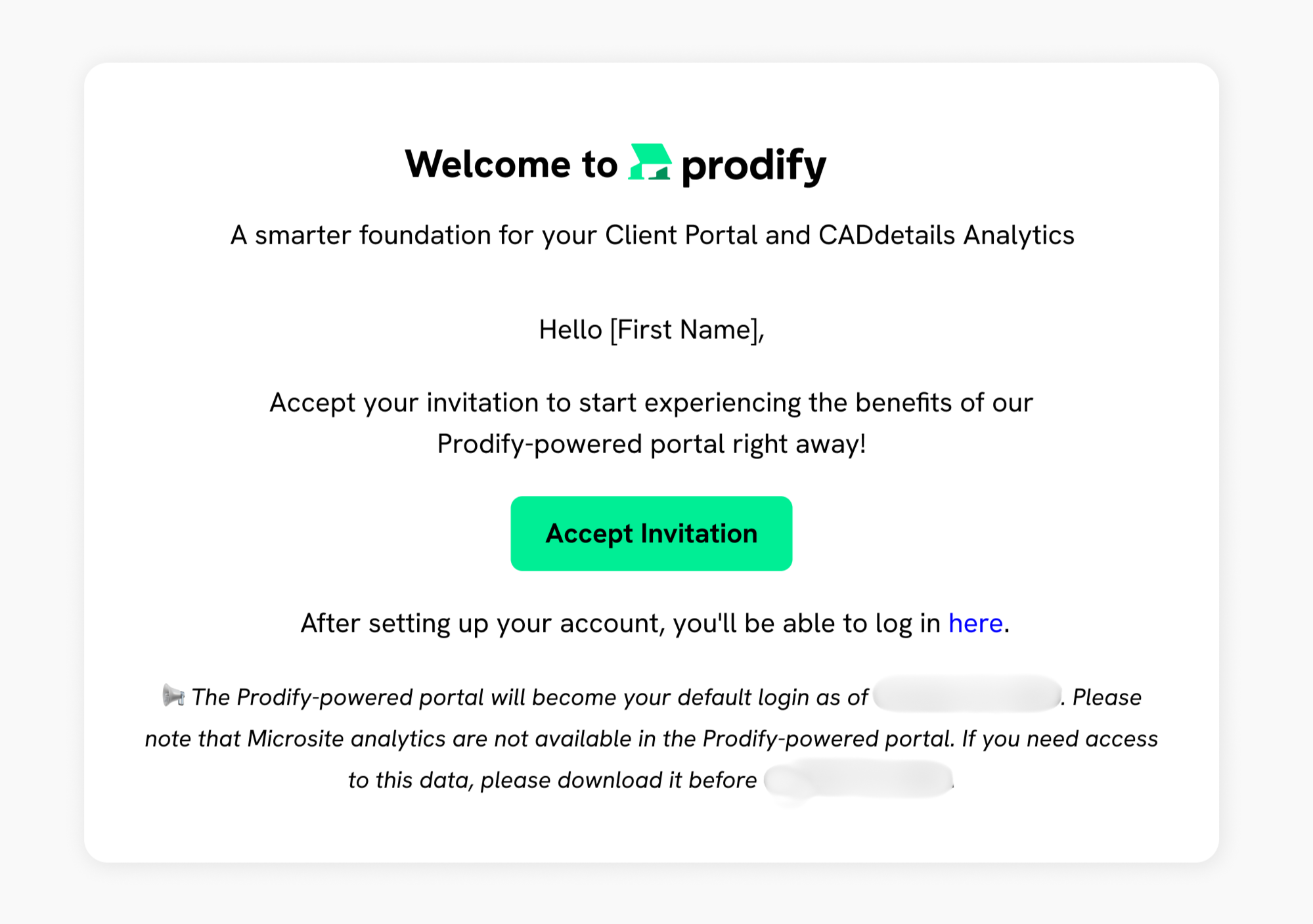
Before you can take advantage of the new features, you’ll need to create your Prodify account.

  • You will receive an invite link in your email with instructions to set up your Prodify account and password. This invite email is sent from admin@tryprodify.com or no-reply@tryprodify.com. 
  • Please double check your junk/spam mail for the email, and allow emails from @tryprodify.com domains.
  • If you cannot find the invite email, please contact support@tryprodify.com.

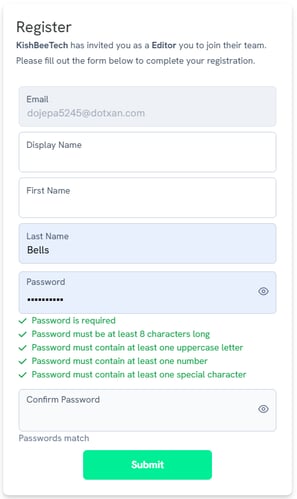
Register

  • Click the link in your email to register for Prodify and create your new password.

You now have a Prodify account and can log in anytime through the dedicated CADdetails login page.

Frame 1 - Edited
portal-registration

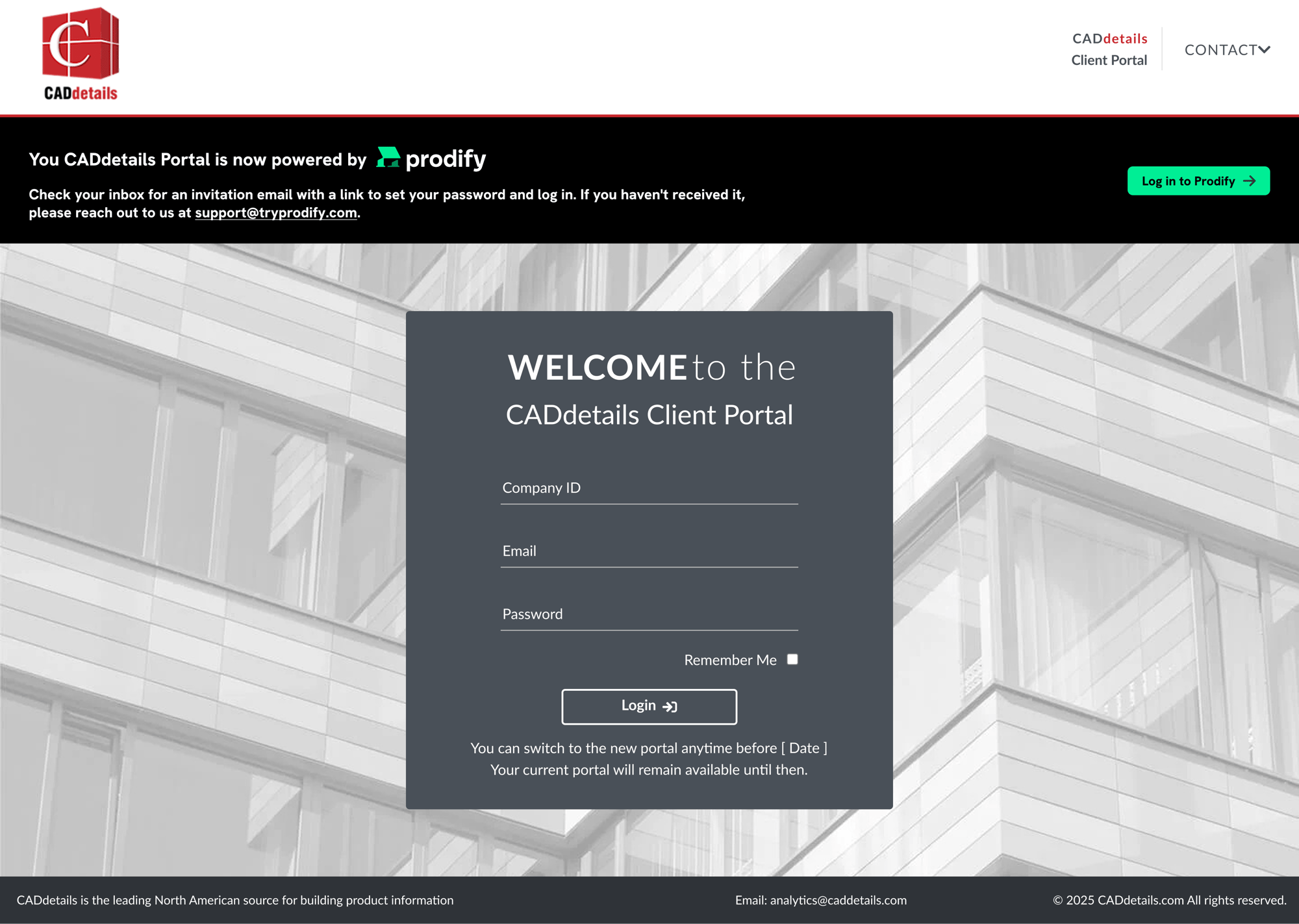
Existing CADdetails Portal

You may notice a banner reminding you of the Client Portal move to Prodify on your current Client Portal.

Once you have used your email link to register for a Prodify account, you can access your Client Portal powered by Prodify through this banner.

The banner will take you to the dedicated login page for CADdetails clients to log in to Prodify. 

Client portal login

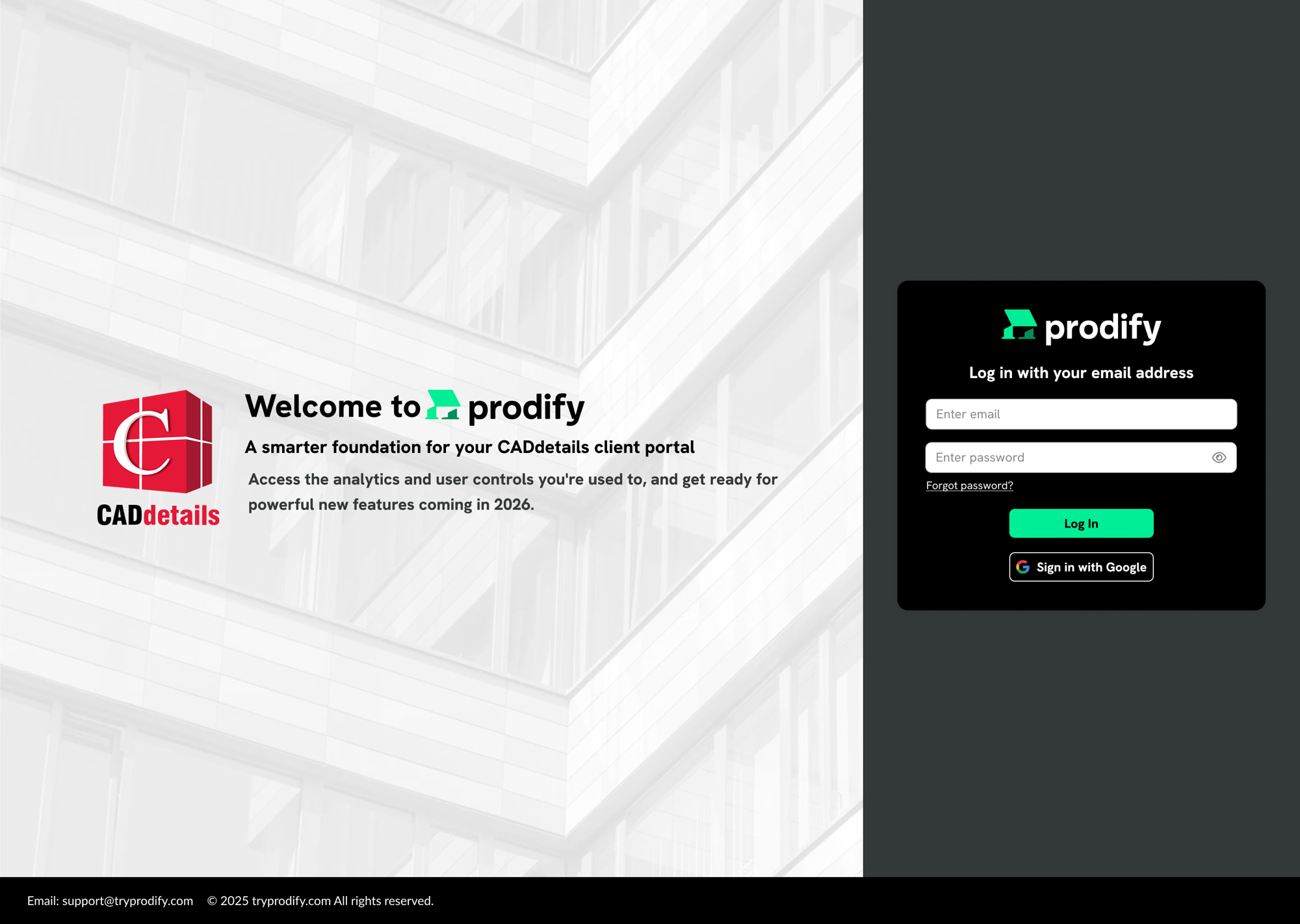
Prodify Login Page

CADdetails customers like yourself will see this login page to access your Client Portal.

Login - Prodify


Part 2: How to Navigate Prodify

Once logged in, you’ll want to know exactly where to find your analytics tools.

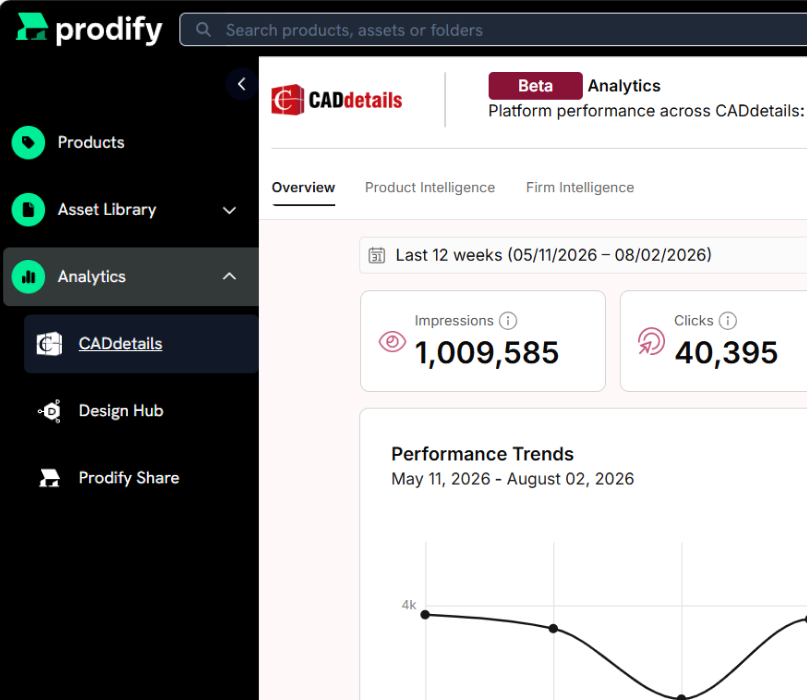
  • Use the left-hand sidebar in Prodify to access:
    • CADdetails Analytics
    • Design Hub Analytics
    • Share Analytics
  • If you do not have access to Design Hub or Share Analytics, you can request access directly from within Prodify Analytics.

You can confidently find and request access to all analytics features.

Analytics-Links-v2


Part 3: Review Your Analytics

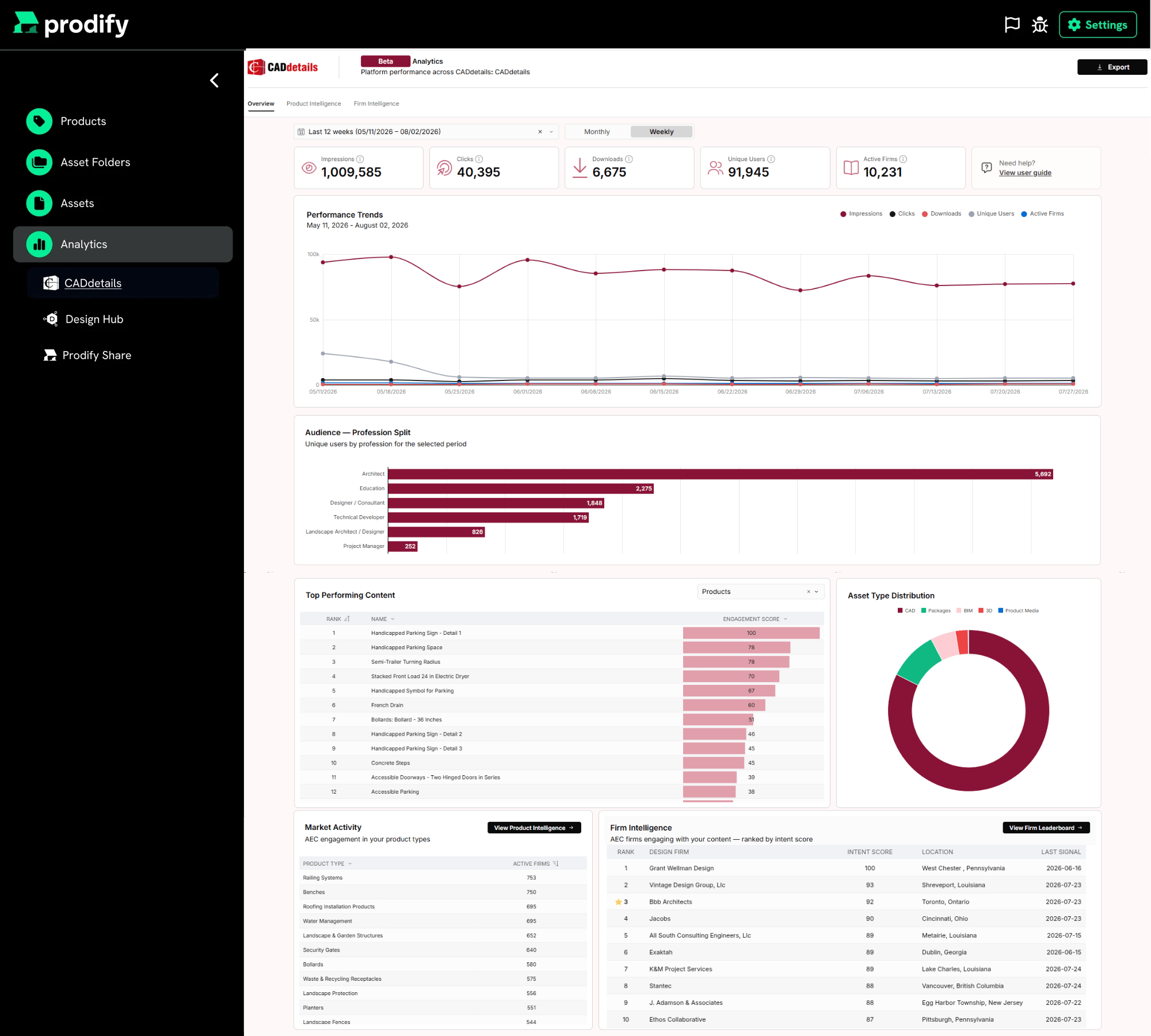
A quick review of your dashboards will give you confidence that your analytics are ready to use in Prodify without interruption.

Process:

  • You will now see two main analytics options: CADdetails Analytics and Design Hub Analytics.
  • Please note: Microsite Projects will no longer be accessible.
  • All other dashboards remain unchanged, so your reporting experience will feel familiar.

You can review your CADdetails and Design Hub analytics in Prodify with no disruption to your workflows.

Analytics-in-Prodify-v2

Frequently Asked Questions

Q: What is the new Client Portal?

Your Analytics will now be available on Prodify, a new platform designed to give you:

    • Streamlined Access to Your Data: The same trusted analytics, now delivered in a cleaner, more intuitive environment.
    • Future-Ready Tools: This is the first step toward a more unified experience, with billing, content management, and other enhancements on the way.
    • A Unified Experience: Your new portal is just the start—over time, all your CADdetails tools will come together in one seamless experience on the Prodify platform.

Q: What is Prodify?
Prodify is a Digital Asset Management (DAM) + Product Information Management (PIM) platform designed to help building product manufacturers streamline content management, improve distribution, and deliver accurate product data to architects, designers, and specifiers.

Q: Is CADdetails rebranding under Prodify?
No, CADdetails remains its own channel brand, powered by Prodify for relevant BPM channels like the client portal analytics.

Q: How is it different from CADdetails?
CADdetails is a distribution & visibility platform (channel for reaching the AEC community).
Prodify is a content management & publishing platform (organizing and managing product data, assets, and specifications).

Q: Is there an additional cost for this upgrade?
No. The new Client Portal is included in your CADdetails subscription at no extra charge.

Q: How do I access the new Client Portal?
You’ll receive an email with instructions to set up your Prodify account and password so you can log in to the new portal.

Q: What if I have trouble logging in and need assistance?
If your login doesn't work, start the "Forgot Password" process to retrieve your access information. If you still experience issues, you can also contact analytics@caddetails.com. 

Q: When will the Client Portal switch to Prodify?
The transition is planned for December. No downtime is expected during the switch.

Q: How will I know when my portal has officially switched to Prodify?
You’ll receive at least 7 business days’ notice by email before the change.

Q: Will my team’s existing user roles and permissions carry over?
Users with access to CADdetails Analytics will be granted Admin access in Prodify. Admins can then assign Editor and Viewer access to other team members once logged in.

Q: What are the user roles in Prodify?

Admins

    • Manage company settings and user accounts.

    • Edit permissions for all content and folders.

    • Access billing and subscription information.

    • Set default views (table, gallery, form).

    • Create share groups.

Best for manager-level users.


Editors

    • Edit and organize content into folders.

    • Add favorites.

    • Share assets and folders externally.

    • Create share groups.

Best for marketing team members.


Viewers

    • View and download content.

    • Add favorites.

    • Share assets and folders.

Best for sales representatives and SDRs.

Q: We have multiple brands listed on CADdetails. How do I access each of them?
If you are associated with multiple companies or brands, each with its own Prodify profile and analytics, you will receive a separate invitation for each company. After accepting your invitations and logging in, you’ll be taken to the company selector page, where all of your available companies are listed.

Q: Will my Analytics change?

    • Your CADdetails Analytics remain unchanged and continue to function as usual.

    • Access to Microsite Projects will no longer be available in the new Client Portal.

Q: Do I have access to my billing in Prodify?
Yes. Admins can view all billing details in Prodify, including invoices, payment methods, and statements—accessible with single sign-on.

Need Assistance?

Drop us a note and we'll be in touch to assist you.
  • Asset & Data Ready

    • Organize Your Assets
    • Technical Member Program
    • Centralize Your Data
  • Channel Ready

    • CADdetails
    • Design Hub
    • AEC Analytics
    • Advertising
  • AI Ready

    • Spec Builder Pro
    • CAD Analyzer
    • SPEC Analyzer
    • AI Discoverability
  • Resources

    • Client Success Stories
    • Get Spec'd Blog
    • Why CADdetails?
    • Free Marketing Resources
    • Referral Program
    • FAQs
  • About Us
    • Onboarding & Support
    • Book a Demo
    • Contact Us

CADdetails ™ © Visions Computer Imaging Systems Ltd. All Rights Reserved.