

Product exclusion in AEC (Architecture, Engineering, and Construction) specs happens when a specifier drops your product before evaluating how it performs. The cause is almost always documentation: missing performance data, incomplete submittals, outdated code references, or files that are hard to find. There is no phone call and no email. The specifier opens the next manufacturer's file and moves on.
This guide covers the 5 most common causes and the steps that keep your products on the shortlist. It also explains how CADdetails helps manufacturers keep spec-ready content in front of the AEC professionals who write project manuals.
Key Takeaways
-
Incomplete specs are the top risk. A specifier cannot write a product into a project manual without performance data, referenced standards, and installation requirements.
-
Submittal gaps trigger substitutions. Missing test reports, listings, or shop drawings give the contractor a reason to propose another product.
-
Code references expire. The International Code Council updates its model codes every three years, so a spec that was current last cycle may not be today.
-
Findability decides the shortlist. Specifiers evaluate the products they can locate and download quickly.
-
Specs work best bundled with design files. On CADdetails, more than half of specification downloads by AEC professionals came packaged with CAD, BIM, or 3D files.
What Is Product Exclusion in Construction Specs?
Product exclusion is the removal of a building product from consideration while a specifier writes the project manual. It usually happens because the product's documentation cannot be dropped into a specification section without extra research.
Most specification sections follow SectionFormat, a joint standard of the Construction Specifications Institute (CSI) and Construction Specifications Canada (CSC). It divides every section into three parts: General, Products, and Execution. MasterFormat, a separate CSI and CSC standard, assigns the section number and organizes sections into divisions across the project manual.
For a deeper look at how spec content is structured, see Product Info Sheets vs. Specs: What's the Difference?
What Are the Most Common Causes of Product Exclusion?
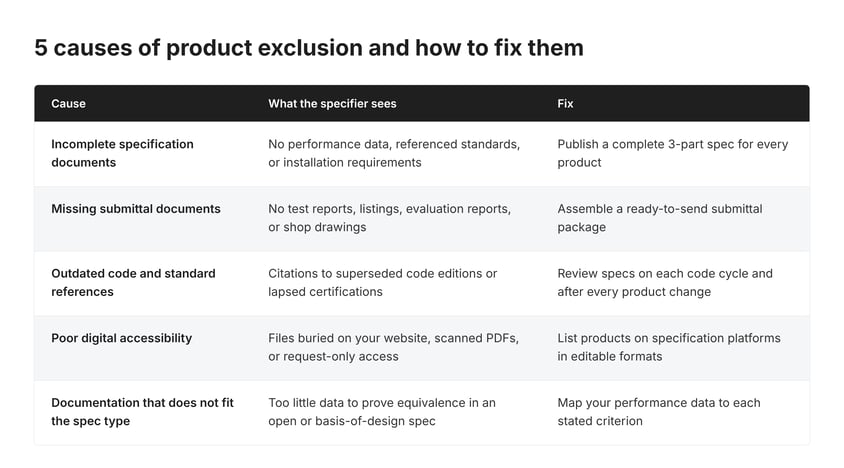
Five documentation problems account for most product exclusions. Each one gives a specifier a reason to stop evaluating your product.
1. Incomplete Specification Documents
Incomplete specification documents are the most common reason a product is excluded. A specifier cannot confirm a product meets project requirements without its fire rating, load capacity, or thermal values. That single gap is enough to remove it from consideration.
The same pattern shows up in design files. According to the CADdetails 2026 AEC Survey, the most common reason design professionals find a file unusable is missing details or dimensions. Specifiers expect your documentation to answer their questions before they ask.
2. Missing Submittal Documents
Submittals verify that the product delivered matches the product specified. After award, the contractor submits manufacturer documentation for the architect or engineer to review. An incomplete package can lead the reviewer to reject the product and accept a substitute.
A complete submittal package includes:
- Manufacturer data sheets that match the specified model and options
- Test reports from recognized laboratories, citing the relevant ASTM or ANSI test methods
- Certifications and evaluation reports, such as UL listings or ICC-ES evaluation reports
- Shop drawings and installation instructions that match current product dimensions
Preparing these documents in advance helps contractors get approval on the first submission.
3. Outdated Code & Standard References
Outdated references make your documentation look unreliable. The International Code Council (ICC) publishes 15 model codes, including the International Building Code (IBC), and updates them every three years. ASHRAE also publishes a new edition of Standard 90.1 every three years. A spec citing a superseded edition signals that the rest of the file may be out of date.
Certifications matter just as much. Projects pursuing LEED or similar programs require documented proof that each material meets the criteria. A lapsed certification gives the specifier a liability reason to exclude your product, and an outdated file can make them wary of your brand on future projects.
4. Poor Digital Accessibility
Specifiers evaluate the products they can find and download quickly. Files buried on your website, available only as scanned PDFs, or locked behind request forms are effectively invisible during research.
AEC professionals expect specs in editable formats like Microsoft Word (DOCX), alongside CAD drawings, BIM models, and 3D models in one place. CADdetails platform data reflects this. In the 12 months ending October 2026, nearly 20% of downloads by registered AEC professionals in the U.S. and Canada included a specification. More than half of those spec downloads were bundled with CAD, BIM, or 3D files.
5. Documentation That Does Not Fit the Spec Type
The type of specification determines how much proof your documentation must carry. Matching your data to the spec type keeps your product eligible when it is not the named product.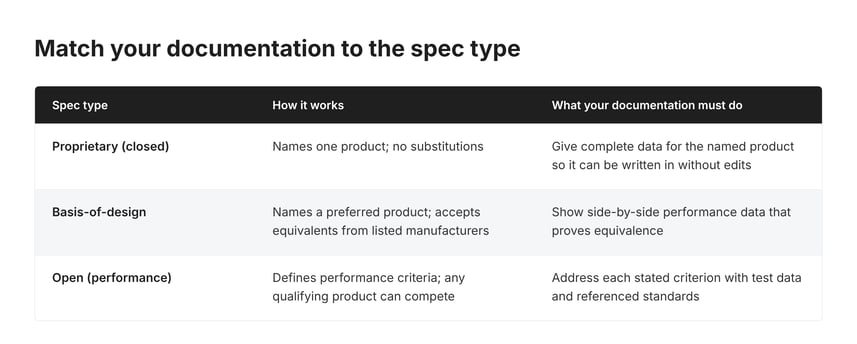
Products supported by verifiable technical data survive evaluation. Products supported mainly by marketing claims rarely do.
How Can Building Product Manufacturers Prevent Product Exclusion?
Manufacturers prevent product exclusion by treating specification documents as a sales asset with an owner and a review schedule. Three steps cover most of the risk.
-
Audit every spec. Confirm each product has a current spec with performance data, referenced standards, and installation requirements. Check submittal documents for gaps before a specifier finds them.
-
Make every file accessible. List products on specification platforms where AEC professionals search. Offer specs in editable DOCX alongside CAD, BIM, and 3D files, and data sheets.
-
Review on a schedule. Review specs at least annually, after every product change, and when new code editions publish. Assign an owner internally or use a partner such as the CADdetails Technical Member Program.
CADdetails' free SPEC Analyzer gives a technical assessment of an existing spec. Try it now→
How CADdetails & Prodify Keep Your Products Spec Ready
CADdetails gives manufacturers one partner for creating, managing, and publishing Spec Ready product content. Prodify adds the content management layer behind CADdetails' publishing reach.
|
Need |
How we help |
|---|---|
|
Organize every asset |
Prodify's Digital Asset Management (DAM) brings CAD, BIM, 3D, and spec files under one roof, so the version you publish is the current one. |
|
Centralize product data |
Prodify's Product Information Management (PIM) creates one home for product data, so performance values stay consistent across specs and data sheets. |
|
Draft specs faster |
Spec Builder Pro generates outline specs in minutes for your team to review. |
|
Build and maintain files |
Our Technical Member Program delivers CAD, BIM, 3D, and spec development and keeps files aligned with current standards. |
|
Reach specifiers |
CADdetails puts your files in front of 750,000+ specifiers across North America. |
|
Measure engagement |
CADdetails Analytics shows who is viewing and downloading your product content. |
Keep Your Products on the Specifier's Shortlist
Product exclusion is preventable. Complete specs, current certifications, organized submittals, and accessible files keep your products in the evaluation instead of out of it. CADdetails & Prodify give you the tools to build that documentation, publish it where specifiers search, and see how they engage with it.
Book a demo to see how CADdetails & Prodify get your products Spec Ready→
FAQs
What is the most common reason a product is excluded from a spec?
Incomplete specification documentation is the most common reason. Without performance data, referenced standards, or installation requirements, a specifier cannot write the product into a project manual.
How do submittal documents differ from specification documents?
Specification documents define which products and performance levels a project requires. Submittal documents prove the product actually supplied meets those requirements. Both must be complete for a product to reach installation.
Can a product be excluded even if it meets performance requirements?
Yes. If documentation does not clearly show compliance, or the files are hard to access, a specifier may exclude a product regardless of its actual performance.
What formats should specification files be available in?
Specifiers prefer editable Microsoft Word (DOCX) files so they can tailor a spec to each project. PDF works as a reference copy but should not be the only format offered.
How often should manufacturers update specification documents?
Review specs at least annually, after any product change, and whenever new code editions publish. ICC model codes and ASHRAE 90.1 both publish new editions every three years.
Cover image by Zac Gudakov on Unsplash