

Imagine having access to data that shows exactly how AEC (Architecture, Engineering, and Construction) professionals interact with your design files. Now imagine that data automatically cleaned, validated, and presented to you in an intuitive, interactive dashboard. That’s exactly what CADdetails Analytics delivers for building product manufacturers.
To better understand how CADdetails captures, processes, and presents this data, we sat down with Natalia Koracin, Senior Analytics Engineer at CADdetails. In this Q&A, she breaks down everything from intent data to data hygiene practices and shares how you can turn your insights into meaningful growth.

Q: Where does CADdetails’ data come from?
Natalia: All our data comes from first-party event tracking on CADdetails. The data is sent to Snowflake, then processed via dbt, and presented in embedded Sigma dashboards for clear analysis.
Q: What’s intent data and why does it matter to manufacturers?
Natalia: That’s a great question. At CADdetails, our intent data provides an accurate view of an AEC prospect’s true level of interest based on their actual behaviors on CADdetails and Design Hub. By revealing how your target AEC audience interacts online, this data shows how interested they are in your products before they contact you, helping you nurture them more effectively and transform that interest into specifications.
Q: How does CADdetails calculate intent data?
Natalia: We use a proprietary algorithm that analyzes the quality, quantity, and recency of AEC engagement with your products and related categories. It then assigns each firm an intent score and ranks the top 250 on your Design Firm Leaderboard, so you can instantly see which firms are most active and worth reaching out to. The Leaderboard updates weekly, allowing you to track shifts in intent and help your team identify hot prospects or firms that may need a gentle nudge.
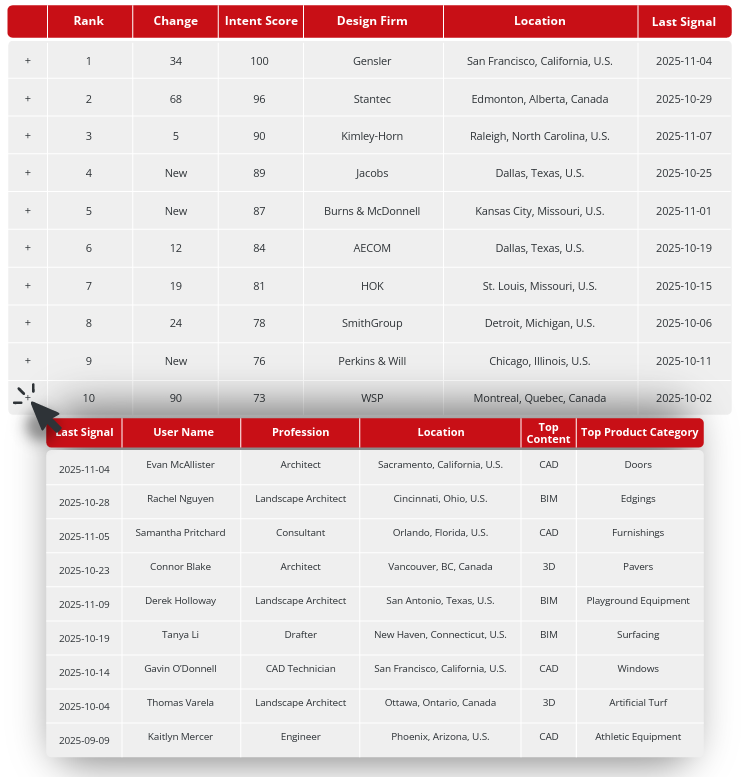
Q: What should manufacturers do with firms that appear on their leaderboard but aren’t ranking very high?
Natalia: Lower intent scores suggest that these firms are engaging with your related product categories but showing stronger interest in competitor content. This presents an opportunity, not a dead end. Consider reaching out with valuable content, like case studies or product brochures. Low intent doesn’t mean low potential—it usually means your brand isn’t top of mind yet. With consistent, helpful engagement, you can gradually move these firms higher on your leaderboard.
Q: How do you clean the data our clients get to ensure quality and accuracy?
Natalia: We use a set of rigorous validation practices, including user authentication, bot mitigation, internal traffic filtering, and audience refinement. These steps help us maintain a high level of data credibility and reliability.
Q: Can you tell me more about these practices?
Natalia: For sure. User validation ensures that every download comes from a verified account, so we’re capturing real professional activity. Internal traffic filtering removes staff, users with your email domain, test account actions, and audience refinement focuses the dataset exclusively on verified AEC professionals in the U.S. and Canada.
Q: What about bot mitigation?
Natalia: Bot mitigation means we continuously identify and remove automated or malicious traffic using industry best practices. Our systems are regularly monitored and updated to stay on top of evolving of web-scraping methodologies and malicious bot attacks.
Q: How can manufacturers use intent data to their advantage?
Natalia: There are many impactful ways for you to use your data, depending on your goals and your team’s priorities. For marketing, you can create more relevant, personalized content for high-intent firms and even build lookalike audiences to expand your reach. For sales, you can quickly identify high-intent firms, anticipate their needs, and time your follow-ups more effectively. And for the product team, understanding which file types and product variants your audience prefers can guide product improvements and enhance the overall AEC user experience when engaging with your products. Basically, our dashboards don’t just show you what’s happening behind the scenes—they show you what to do next.
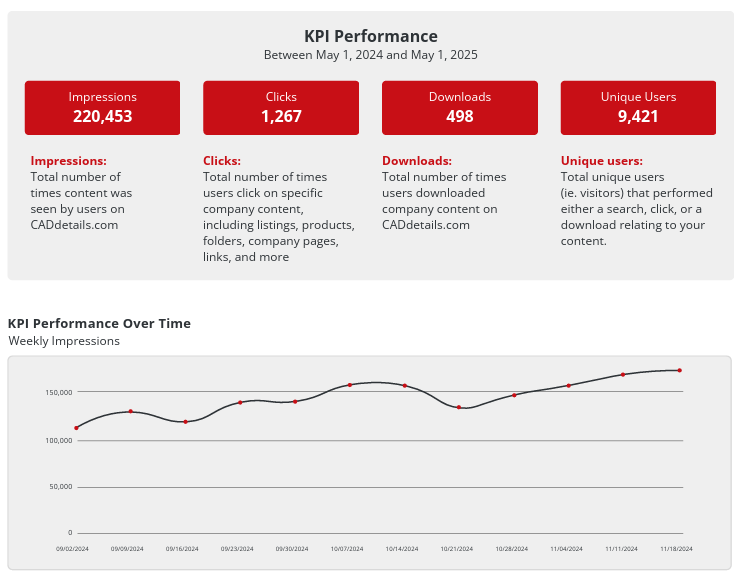
Learn more about how to use your intent data→
Q: What are some key CADdetails stats you’d like to highlight?
Natalia: We’ve built an incredible community of AEC professionals. More than 750,000 North American AEC professionals are registered with CADdetails, and we see over 1.1 million visitors to the site every year and about 2.3 million design file downloads. These numbers are all strong indicators of how essential CADdetails has become in helping AEC professionals connect the right products to the right projects.
Download our site metrics for more helpful insights into AEC engagement on CADdetails→
Q: 2.3 million downloads is a big number—what drives that volume?
Natalia: Each download represents a real action from a verified AEC professional on CADdetails.com. In addition to specific file downloads, our QuickPack feature allows users to download grouped, category-based files across multiple relevant products or manufacturers. This batching capability increases download volume while still representing real professional activity. To give you a sense of what our clients typically experience, many featured manufacturers see 1,200–2,100 downloads per profile each year, which shows consistent exposure, engagement, and measurable ROI.
Wrapping Up: Why This Data Matters
From revealing how AEC specifiers interact with your design files to highlighting high-intent firms, CADdetails Analytics gives manufacturers insight into their target audience in a way they’ve never had before. With clean, reliable data at your fingertips, you can make confident, strategic decisions that improve your bottom line. It’s data that works for you, so you can focus on growing your brand, driving conversion, and nurturing customer relationships from the early stages of project development.
Learn more here or book a demo to get started.
Already a client? Log in here to see your data.
Cover image by Scott Webb on Unsplash